The Transmittal Letters module in PASconcept enables companies to formally send, track, and manage critical project documents and packages shared with clients, partners, and team members. This feature ensures all transmittals are traceable, well-organized, and professionally formatted. From file uploads to signed and sealed records, every interaction is logged for accuracy and accountability.
Key Capabilities:
Transmittal Creation and Tracking:
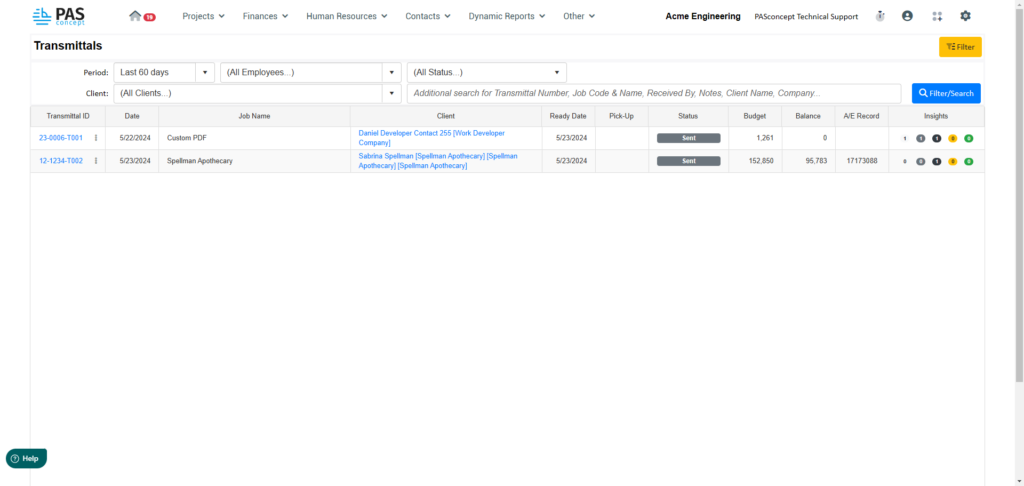
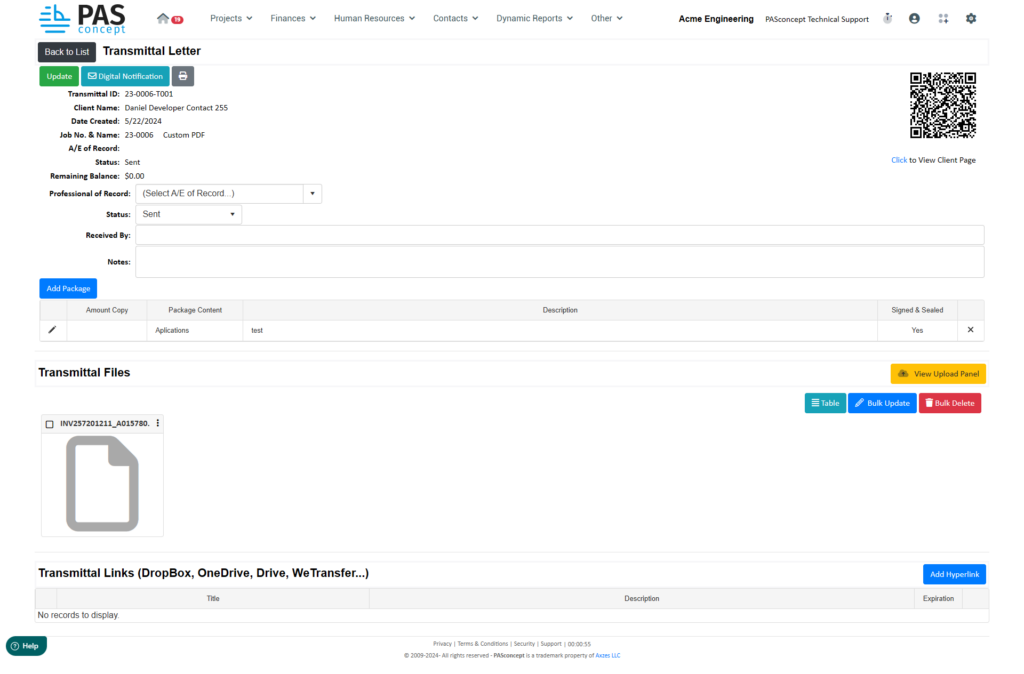
Essential Metadata: Each transmittal includes a unique ID, creation date, client name, job number and name, and A/E of Record.
Professional of Record: Assign a responsible party to the transmittal to provide accountability and ensure appropriate oversight.
Status Management: Track whether the transmittal is "Sent," "Viewed," or "Received" to monitor its progress through the delivery process.
Notes and Delivery Details: Record internal notes, recipient names, and pickup/delivery dates for full documentation.
Package and File Management:
Add Packages: Users can build a package within the transmittal including:
Number of copies
Content description (e.g., applications, permits)
Signed & sealed designation
Direct File Uploads: Upload documents directly to each transmittal for client access and permanent recordkeeping.
Transmittal File Viewer: Files appear in a dedicated section for visibility and easy management.
External Link Integration:
Hyperlink Support: Add URLs to files stored on external services (Dropbox, Google Drive, OneDrive, WeTransfer, etc.).
Expiration Options: Optionally configure expiration dates for external links to control long-term access.
Link Description: Title and describe each hyperlink to provide clarity to recipients.
Client-Facing Transmittals:
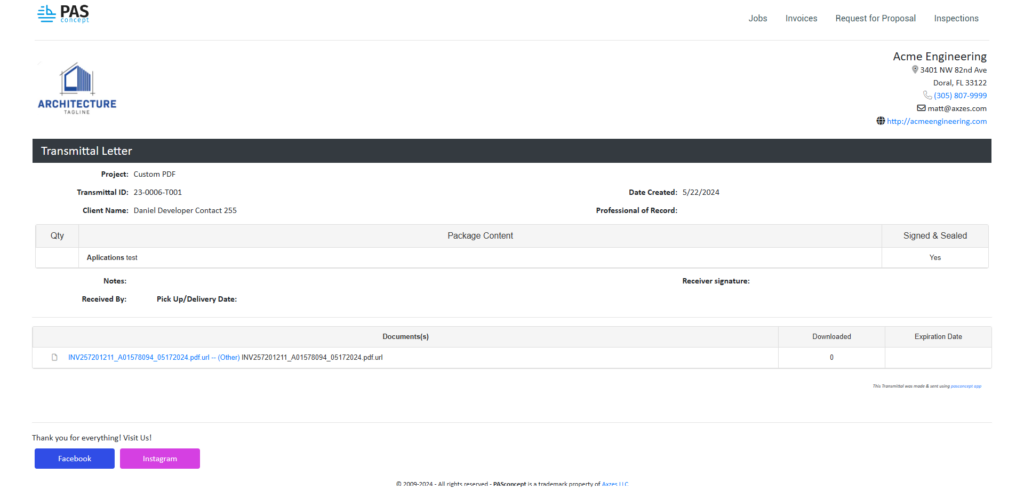
Branded Output: Clients receive a clean, professional PDF-styled page with project, package, and download information.
Live File Access: Links to files are active, and download tracking logs how many times a file was accessed.
Signature Capture (Optional): Printed versions can be manually signed upon receipt if necessary.
Bulk and Automation Tools:
Bulk Update/Delete: Easily manage multiple transmittals at once to reduce administrative overhead.
Upload Panel: Drag-and-drop support for uploading multiple documents quickly.
Help Panel: Integrated help section allows users to access documentation or submit support requests easily.
Benefits:
| Feature | Benefit |
|---|---|
| Formal File Delivery | Ensures each document is sent and tracked through a standardized workflow. |
| Real-Time Visibility | Tracks status and user interaction for transparency and control. |
| Organized Recordkeeping | All transmittals are saved, with full download logs and job linkage. |
| Reduced Email Dependence | Replaces manual email chains with an integrated system-wide approach. |
| Enhanced Accountability | Assign responsible professionals and track exactly what was sent and when. |
Implementation Steps:
1. Activate the Module:
Ensure the Transmittals module is enabled in your system settings. If not, contact PASconcept support.
2. Configure User Access:
Grant access to relevant employees who will create, send, or manage transmittals.
3. Create a Transmittal:
Navigate to the “Transmittals” tab → click “Create New” → fill in required fields and upload packages/files.
4. Add Files or Links:
Drag files into the upload panel or paste a hyperlink to an external storage location.
5. Send and Track:
Click “Send” or “Notify Digitally” to alert the client. Monitor status and downloads from the internal view.
Example Usage Scenario:
User Input:
An employee at Acme Engineering creates a new transmittal for a job named "Custom PDF" for client Daniel Developer.
File Upload:
The user adds one signed & sealed application in a package labeled “Applications test” and uploads a PDF document.
Client Access:
The client receives a transmittal page with:
A professional summary of the package
A secure link to download the file
A record of whether the document has been downloaded
Internal Tracking:
The transmittal is saved under “Transmittals” with all metadata, upload history, and package details logged.
By using the Transmittal Letters module, PASconcept users can ensure that critical documents are delivered in a formal, trackable, and professional manner—reducing errors, improving compliance, and streamlining communication across all phases of a project.
Transmittal List
Transmittal Detail – Internal View
Transmittal Detail – Client View
Was this article helpful?
That’s Great!
Thank you for your feedback
Sorry! We couldn't be helpful
Thank you for your feedback
Feedback sent
We appreciate your effort and will try to fix the article