The Detailed Property Information Retrieval feature allows users to obtain comprehensive property data using just the property’s address. This feature streamlines the process of gathering property details, making it quick and efficient for users to access valuable information. Each property data request is tracked in a log, ensuring transparency and accountability. The feature operates on a credit system, where each successful property request deducts one credit from the user’s balance. Company administrators have control over the credit purchase and recharge options to ensure consistent access to the feature.
Key Capabilities:
- Property Information Retrieval:
- Address Input: Users can enter a property address into a designated input field to retrieve detailed information.
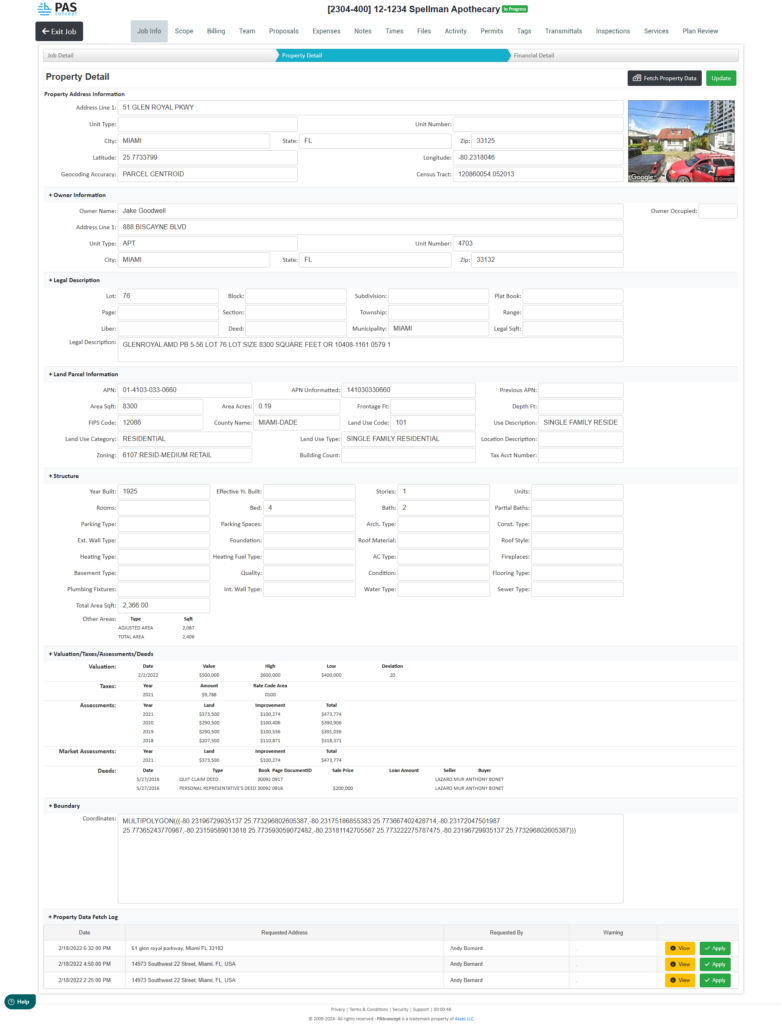
- Automated Data Fetching: The system automatically gathers and populates comprehensive property details, including address information, owner details, legal descriptions, land parcel information, structure specifics, valuations, taxes, assessments, deeds, boundaries, and any additional relevant data.
- Google Maps Integration: Provides a visual representation of the property using Google Maps for location verification and context.
- Request Logging:
- Request History: A detailed log of all property data requests made by the user is maintained. This log includes timestamps, requested addresses, requested by whom, and any associated warnings.
- View and Apply Options: Users can view the details of past requests and apply the retrieved data to their current session.
- Credit System:
- Credit Deduction: Each successful property information request deducts one credit from the user’s balance.
- Credit Balance Display: Users can view their remaining credit balance in real-time.
- Purchase and Recharge Options: Company administrators can determine how many credits to purchase initially and set up automatic recharge options to maintain a steady supply of credits. This can be configured based on usage patterns and business needs.
- Notification Alerts: Alerts can be configured to notify administrators when the credit balance is low or when recharges occur.
Benefits:
- Efficiency: Speeds up the process of obtaining detailed property information, reducing manual research and data entry.
- Accuracy: Ensures that property data is accurate and up-to-date, minimizing the risk of errors.
- Accountability: Maintains a comprehensive log of all data requests, providing transparency and accountability.
- Control: Allows administrators to manage credit usage and ensure that resources are allocated efficiently.
Implementation Steps:
- Activate the Feature:
- Ensure that the property information retrieval feature is activated within the system settings.
- Configure Credit System:
- Set up the initial credit balance and configure automatic recharge settings. Define the credit purchase amounts and recharge frequency as per company requirements.
- User Training:
- Provide training to users on how to use the feature, including how to enter property addresses, interpret the retrieved data, and understand the credit system.
- Monitor Usage:
- Regularly review the request log to monitor usage patterns and ensure credits are being used effectively.
- Adjust credit purchase and recharge settings as needed based on observed usage and business needs.
Example Usage Scenario:
- User Input:
- A user enters the address “51 Glen Royal Pkwy, Miami, FL” into the property information retrieval input field.
- Data Retrieval:
- The system fetches detailed property data and displays it in a structured format, as shown in the attached image. This includes information about the property’s location, owner, legal description, land parcel, structure details, valuations, taxes, assessments, deeds, and boundaries.
- Request Logging:
- The request is logged, showing the date and time of the request, the address requested, and the user who made the request. The user can view and apply this data as needed.
- Credit Deduction:
- One credit is deducted from the user’s balance for the successful retrieval of property information.
- Administrator Control:
- Administrators can review the request logs, manage credit balances, and adjust recharge settings to ensure uninterrupted access to the feature.
By implementing this feature, companies can greatly enhance their ability to efficiently and accurately gather property information, improving overall operational effectiveness and decision-making.
Was this article helpful?
That’s Great!
Thank you for your feedback
Sorry! We couldn't be helpful
Thank you for your feedback
Feedback sent
We appreciate your effort and will try to fix the article